
AI Reply for Bumble: One Tap, No Screenshots | SLIDD AI
AI Reply for Bumble: Get a Finished Message Without Leaving the Chat
The fastest AI reply for Bumble is one that reads the chat where it already sits. SLIDD AI is an iOS keyboard that does exactly that: switch to it in the Bumble message field, tap Reply, and a finished message lands in the box. No screenshot, no second app, no pasting.
Most AI reply tools make you do the work before the AI does any. SLIDD flips that order.
What Is an AI Reply for Bumble?
An AI reply generator for Bumble reads a match's message and writes a response you can send. The useful ones see more than the last line: her profile photos, her prompts, and the conversation so far. Tools that only see pasted text can only guess, and guesses read like templates.
That gap decides whether a reply sounds like you or like a chatbot. A line like "That sounds fun! What do you like to do?" could be sent to anyone, which is the problem.
Key Takeaways
- SLIDD AI reads your Bumble screen in real time (her message, her photos, her prompt) and writes the reply inside the app.
- Five tone presets (Flirty, Bold, Witty, Sincere, Casual) let you match her energy and the stage of the conversation.
- Screenshot-based tools like Rizz AI, YourMove AI, and Wing AI require you to leave Bumble, upload, copy, and paste back.
- The same keyboard works in Hinge, Tinder, Instagram, WhatsApp, iMessage, and any app with a text box.
- Start with a 3-day unlimited free trial. Paid plans run $6.99 weekly, $19.99 monthly, or $99.99 yearly.
Why Slow, Generic Replies Fail on Bumble
Bumble moves on a clock. Matches expire, and the person who answers fast with something specific usually keeps the thread alive.
Freezing is the real cost. You stare at her message, draft three versions in your head, and send none of them. That freeze is the exact moment a reply tool should remove.
- A "Hi" with nothing behind it dies fast.
- A reply that ignores her prompt looks like you didn't read her profile.
- A long pause after her good message cools the whole conversation.
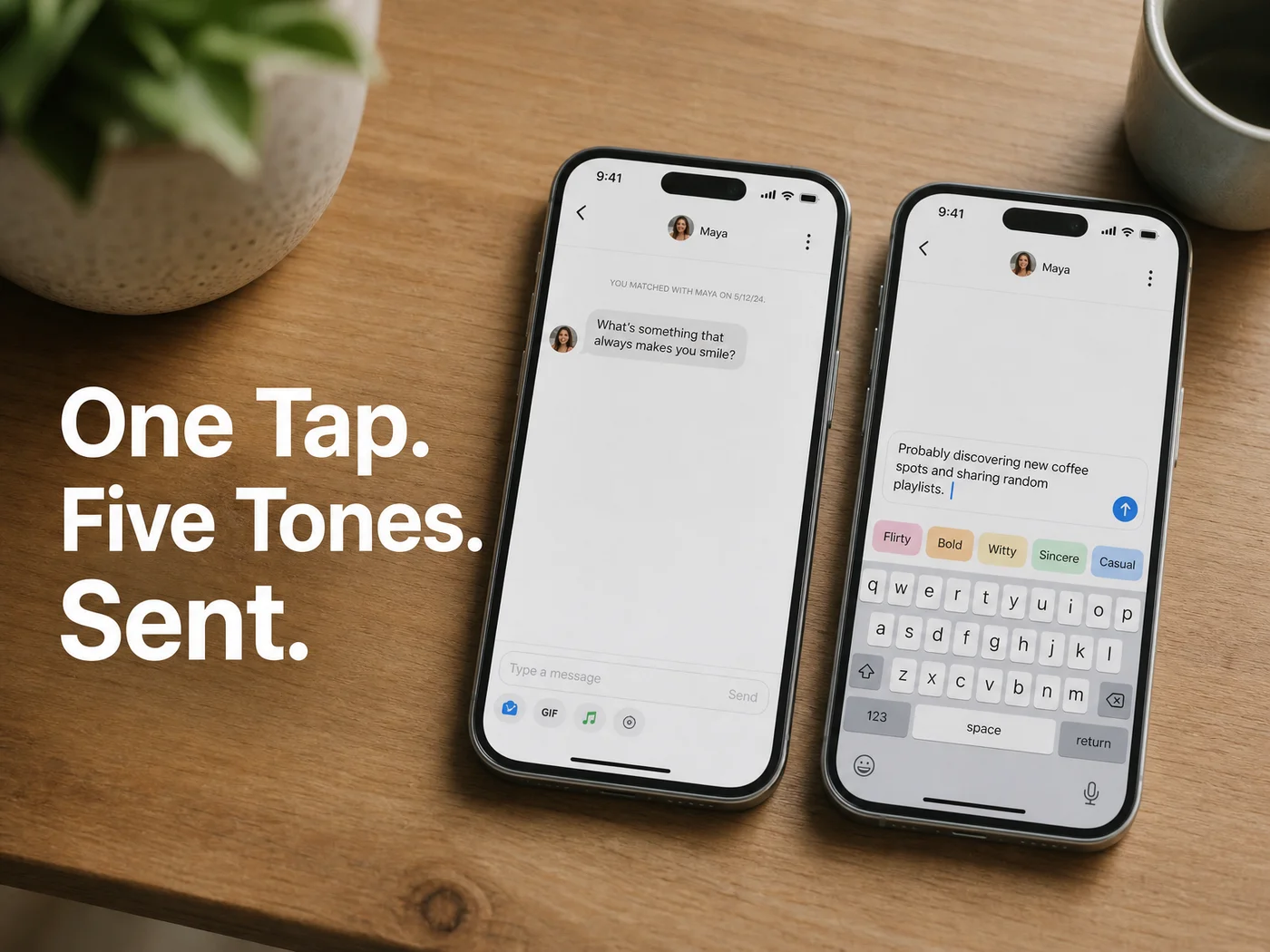 The tone row sits above the keys, so picking a register takes one tap.
How SLIDD Writes an AI Reply for Bumble
SLIDD is a system keyboard. Open the Bumble chat, tap the message field, switch to the SLIDD keyboard, and tap Reply. SLIDD reads the visible screen in real time, writes a reply in your chosen tone, and inserts it into the field. You hit send.
Here is the whole flow:
- Open the match in Bumble and tap the message field.
- Switch to the SLIDD keyboard.
- Tap Reply.
- SLIDD reads her last message, her profile photo, and her prompt on screen.
- The reply appears in the text field in your selected tone.
- Edit if you want, then send.
Under the hood, SLIDD uses iOS screen broadcast (the same technology as screen recording) to capture the frame when you tap Reply. A vision model interprets it, and a second pass writes the reply for the stage you're at: opener, mid-conversation, escalation, or close. According to the product's privacy design, that frame is processed in real time and discarded, not stored or used for training.
Reality check: Reading her photo and prompt is the part screenshot apps can't match in the moment, because by the time you've uploaded them, you've left the conversation.
Can AI Write Better Bumble Replies Than I Can?
Sometimes, yes, and mostly because it removes the freeze, not because it's cleverer than you. An AI that sees her profile can point at a detail in two seconds that you'd take ten minutes to find. You still decide what gets sent.
Take a match whose Bumble prompt says she's looking for someone to split a very large pizza. A weak reply is "Haha I love pizza too." A reply that actually engages looks like this:
- "I'm in on the pizza, but I need to know your position on pineapple before we go any further."
- "Large pizza is a commitment. I'll bring the appetite if you bring the opinions."
Same idea with a photo. If she's holding a climbing rope in her first picture, "Please tell me that rope is for climbing and not a hostage situation" beats "Nice pic!" every time.
That's the pattern SLIDD runs for you: notice the specific detail, then write a complete line around it.
Does SLIDD Work on Bumble?
Yes. SLIDD is one of eight core cross-app integrations the keyboard is tuned for, and Bumble is on that list alongside Hinge and Tinder. Because it's a keyboard rather than a dating app, it works in Bumble chats and in any other iOS app with a text field.
SLIDD is iOS only for now, live in the App Store for the US and Canada with an 18+ rating. There's no Android version yet, so don't plan around one.
 One keyboard, every chat she might move to next.
Five Tones for Every Stage of a Bumble Conversation
SLIDD offers five tone presets plus a custom option: Flirty builds tension, Bold takes the lead, Witty goes for the laugh, Sincere keeps it honest, and Casual keeps things easy. Pick the one that fits her last message and where the conversation stands.
A few complete examples, all sendable as written:
| Her message | Tone | Reply |
|---|---|---|
| "I just got back from a trip to Lisbon" | Witty | "Lisbon. So you're the reason the pastel de nata supply is low." |
| "Long day, honestly" | Sincere | "Sorry it's been rough. Tell me the one good thing that happened and we'll start there." |
| "Free this weekend?" | Bold | "I am now. Saturday, 7pm, you pick the place and I'll pick the dessert." |
| "lol you seem trouble" | Flirty | "Only the fun kind. You'll have to find out which." |
The custom tone takes a short description, such as "dry humor," if none of the five fits.
How SLIDD Differs From Other AI Bumble Tools
SLIDD works inside the app; most alternatives work beside it. Rizz AI, YourMove AI, and Wing AI take a screenshot you upload, while RizzGPT needs you to paste the text yourself. Each adds steps between her message and your answer.
The screenshot loop looks like this: see her message, screenshot, leave Bumble, open the other app, upload, wait, copy, switch back, paste, send. SLIDD collapses that to tap Reply.
ChatGPT has the same limit, since it can't see your screen. For a closer look at that comparison, read our piece on using ChatGPT for dating, or see how Wing AI stacks up.
Can You Use SLIDD Without Leaving the Bumble App?
Yes, that's the point of it. The keyboard opens over the Bumble chat, reads what's visible, and writes into the same message field. You never switch apps, copy anything, or upload a screenshot.
The same habit carries over when the conversation moves. For the Instagram version of this workflow, see AI reply for Instagram DM. And if you're still working on how to start, our guide to the best Tinder openers works just as well on Bumble.
Get Started with SLIDD AI
Every new account gets 3 days of unlimited replies and every tone, with no payment at signup. That's enough to run a full Bumble conversation from first reply to a date ask.
FAQ
What is a good reply to "hi" on Bumble?
Match her effort and add a hook. Something like "Hi back. I'm told the only correct answer to your first prompt is tacos, so I'm checking you agree" gives her something to answer. A bare "Hi" back usually ends the thread.
Can you have AI reply to text messages?
Yes. An AI keyboard such as SLIDD AI reads the message on your screen and writes a reply inside the same text field. You review it and choose whether to send, so the final decision stays yours.
Is SLIDD AI free to try?
SLIDD AI starts with a 3-day unlimited trial, with every tone and no payment at signup. After that, plans are $6.99 weekly, $19.99 monthly, or $99.99 yearly, and all of them unlock unlimited replies and the custom tone builder.
Does SLIDD work on Android?
Not yet. SLIDD is an iOS keyboard, available in the US and Canada, and Android is on the roadmap. Today it works on iPhone across Bumble, Hinge, Tinder, Instagram, WhatsApp, and iMessage.